Platform Module
Warehouse
Receiving → Putaway → Pick/Pack/Ship (plain English)
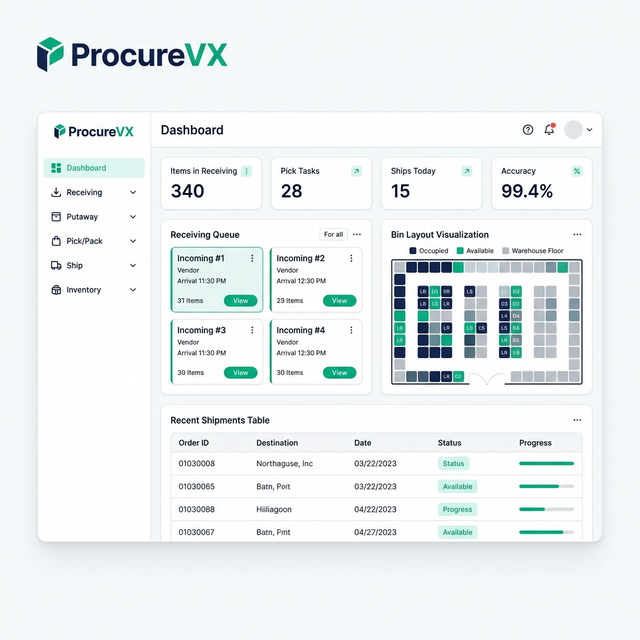
Warehouse execution made simple: receive goods, record discrepancies, put items away into bins, pick and pack orders, then ship confirm for carrier handoff — with inventory accuracy loops like cycle counts and audited adjustments.
Common Warehouse Challenges — And How We Fix Them
Inaccurate inventory from manual counts
Perpetual inventory with cycle count automation
Pick errors causing costly returns
Guided pick/pack with barcode validation
No visibility into receiving queues
Real-time receiving dashboard with discrepancy alerts
Capabilities
What Warehouse Can Do
Site selection + work queues
Start every shift in the right warehouse/site, then execute from prioritized queues: receiving, putaway, picking, packing/shipping, and exceptions.
Receive against PO/ASN (scan-friendly)
Confirm what arrived vs what was expected. Support partial receiving, attachments, and fast exception capture at the dock.
Discrepancy capture + holds
Record over/short/damaged/wrong item/lot/serial with reason capture and photo upload. Optionally quarantine inventory until resolved.
Putaway tasks + location visibility
Move product into bins/locations and keep on-hand searchable by item, lot/serial, and location — including “no space” alternates.
Picking with short-pick handling
Pick lists/waves with scan-to-confirm steps and clear short-pick workflows that escalate to cycle count/adjustment or backorder/substitution.
Packing, labeling, and ship confirm
Pack and label cartons/pallets, stage shipments, and ship confirm to make “inventory left the building” official with supporting documents.
Inventory accuracy loop
Cycle counts and audited adjustments keep inventory reliable and reduce future shortages and reconciliation issues.
End-to-End Flow
End-to-end lifecycle (Receiving → Ship Confirm)
A clean sequence that mirrors physical warehouse work: confirm receipts, store product, allocate when needed, then pick/pack/ship — while keeping inventory accurate.
- Step 1
Select warehouse/site + see today’s work
Work is location-specific. Select the warehouse and start from prioritized queues (receiving, putaway, picking, packing/shipping).
- Step 2
Receiving (goods arrive)
Receive against an expected document (often a PO/ASN), confirm what arrived, and create a receipt (full or partial).
- Step 3
Inspection + discrepancy handling
Record over/short, damage, or wrong item/lot/serial immediately. Optionally flag items as on-hold/quarantine.
- Step 4
Putaway (store in bins)
Move product from dock to storage locations. Update inventory locations and handle “no space” with suggested alternates.
- Step 5
Allocation / reservation (optional)
Reserve inventory to demand (sales orders, work orders) so teams can see available vs reserved and avoid double-commits.
- Step 6
Picking (collect for shipment)
Pick from bins using task lists/waves and scan confirmations. Capture pick shorts and reasons when full quantities aren’t available.
- Step 7
Packing + labeling
Pack into cartons/pallets, print labels and packing slips, and stage shipments for pickup. Support reprints and corrections.
- Step 8
Ship confirm + transportation handoff
Ship confirm is the official moment inventory leaves the building. Output documents (packing list/BOL) and link to transportation tracking.
- Step 9
Inventory accuracy loop (cycle counts/adjustments)
Regular counts and audited adjustments keep on-hand reliable and reduce future pick shorts and reconciliation issues.
30 Seconds to Your "Aha" Moment
Watch how ProcureVX replaces fragmented tools with one unified platform — automatically, accurately, and at a fraction of the cost.
Platform Walkthrough
From PO to Payment in 30 seconds
Who It's For
Warehouse roles mapped to the work you do every day.
Each role has a focused queue and a scan-friendly path through receiving, putaway, picking, and shipping — with clear exception handling when reality doesn’t match the plan.
Receiver
Checks deliveries and records received quantities against expected documents.
- Receive against PO/ASN with expected vs received quantities
- Scan-friendly item entry and fast partial receiving
- Capture delivery notes, attachments, and exceptions at the dock
Inventory Clerk
Manages putaway, locations/bins, and inventory accuracy tasks.
- Work putaway task lists and confirm bin/location
- Handle “no space” with alternate bin logging
- Run cycle counts and adjustments with audit trails
Picker / Packer
Picks items from bins and packs/labels shipments for staging and pickup.
- Pick tasks/waves with scan-to-confirm bin and item
- Capture pick shorts with reasons (and trigger follow-up actions)
- Pack station workflow with carton labels and reprints
Warehouse Supervisor
Manages priorities, exceptions, and performance across the site.
- Monitor today’s work queues across receiving/putaway/pick/pack/ship
- Review exception buckets (discrepant receipts, short picks, on-hold items)
- Reprioritize work and ensure throughput targets are met
Expected Outcomes
- Faster dock-to-stock time with clear receiving and putaway tasks
- Fewer shipping errors with scan confirmations and pack/label consistency
- Better exception visibility for damage, shortages, and on-hold inventory
- More reliable on-hand quantities through cycle counts and audited adjustments
Governance (RBAC) for operational control and auditability
- Receive against expected documents (PO/ASN)
- Record discrepancies with reasons and attachments/photos
- Create partial receipts and confirm completion
- Execute putaway and manage bins/locations
- Perform cycle counts and submit inventory adjustments (approval-controlled)
- Search inventory by item/lot/serial/location
- Execute pick tasks/waves with scan confirmations
- Record pick shorts and stage shipments
- Pack, label, and reprint documents
- Prioritize and reassign work across queues
- Review and resolve exceptions/on-hold inventory
- Approve substitutions/overrides where configured
- View performance and throughput summaries
Acceptance criteria highlights
- User can receive against PO/ASN and create a full or partial receipt
- Expected vs received is visible per line/item, with scan-friendly entry
- Discrepancies capture reason and optional photo/attachment, and can flag on-hold/quarantine
- Putaway task list supports confirm bin/location and quantity
- Directed putaway suggestions are supported (optional)
- No-bin-capacity can be handled with alternate bin selection and logged decision
- Pick tasks/waves support scan-to-confirm and short-pick reasons
- Pack station supports carton labels, packing slip, and reprints
- Ship confirm updates shipment status and marks inventory as shipped (leaving the building)
- Cycle count tasks exist and result in audited inventory updates
- Adjustments require audit trail (who/when/why) and can be approval-controlled
FAQ
Common Questions About Warehouse
Do we have to receive against a PO?
Not always. Receiving is commonly PO-based, but the workflow can also support receipt against an ASN or other expected document depending on your process.
What happens when something arrives damaged or short?
You record a discrepancy with a reason and optional photo/attachment. Inventory can be placed on hold/quarantine and the exception can be routed to the right team for resolution.
How do you handle “pick short” situations?
Pickers can short pick with a reason. The system can escalate to cycle count/adjustment, allow backorder/substitution, and keep an audit trail of what happened.
What does ship confirm mean?
Ship confirm is the official moment goods leave the warehouse. It finalizes the shipment status, updates inventory, and enables downstream tracking in Transportation.