Platform Module
Transportation
Shipment planning → delivery confirmation (plain English)
Transportation is how shipments move from dock to destination: choose a carrier and service level, tender the load, track milestones in transit, confirm delivery with proof-of-delivery (POD), and route freight charges to finance for audit and payment.
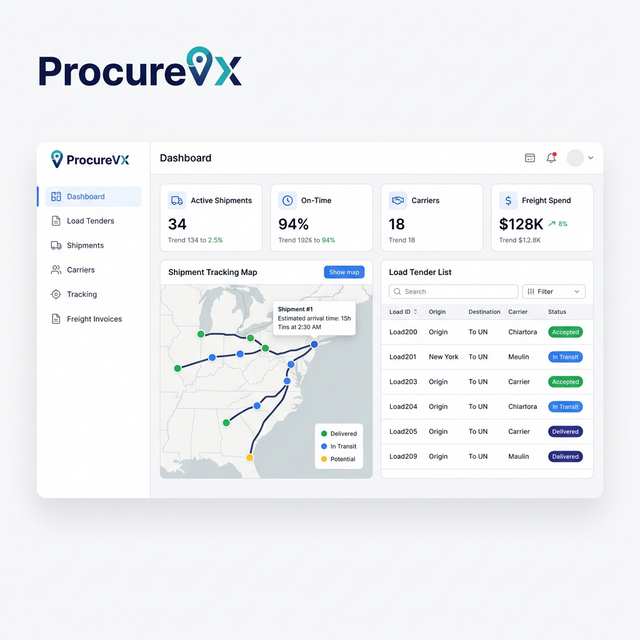
Common Transportation Challenges — And How We Fix Them
Load tendering via phone and email
Automated load tendering with carrier response tracking
No in-transit shipment visibility
Real-time tracking with proactive exception alerts
Freight invoice disputes and overpayments
Automated freight audit and settlement
Capabilities
What Transportation Can Do
Ready-to-ship queue (warehouse handoff)
Start from what the dock has ready: destination, weight/volume, service constraints, and “must deliver by” dates to prioritize planning.
Carrier + service selection (rules / rate shop)
Choose between cost and speed, with optional rate comparisons and simple rules for expediting when needed.
Document generation + attachments
Generate BOL/labels and keep shipment paperwork in one place with reprint support and controlled attachments.
Tendering with response tracking
Tender shipments and track pending/accepted/rejected/expired outcomes in a timeline so everyone sees the latest commitment.
Pickup appointments + confirmation
Capture scheduled pickup details and record confirmed pickup events, creating a clean “left the building” handoff to tracking.
Tracking milestones + ETA + delay risk
A milestone timeline shows progress and ETA updates. Delay risk flags help teams act before customers are impacted.
Delivery confirmation (POD) + claims hook
Store proof of delivery and provide a clear path to report shortages/damage and link claims to the shipment and finance workflows.
Freight audit handoff to finance
Connect shipment → freight bill → approval/payment status so disputes and payments are traceable and easy to explain during demos.
End-to-End Flow
End-to-end lifecycle (Shipment planning → Delivery confirmation)
A clean transportation flow: warehouse handoff, tendering, pickup, tracking, delivery confirmation, and freight audit — with exception handling built into the timeline.
- Step 1
Shipment becomes ready (handoff from Warehouse)
Packed goods are ready for pickup. The shipment enters a ready-to-plan/tender queue with ship-to, weight/volume, and special handling visibility.
- Step 2
Choose service level + carrier (rate/shop)
Select the best option based on cost vs speed and performance. Optional rate comparison and simple rules (e.g., expedite when due date is near).
- Step 3
Create shipment documents
Generate and manage documents like BOL, labels, and (if needed) commercial invoices. Reprint support and an attachment repository keep paperwork controlled.
- Step 4
Tender shipment to carrier
Offer the shipment to a carrier. Track responses: accepted, rejected, or expired/no response — all captured in a tender timeline.
- Step 5
Pickup scheduled + confirmed
Carrier commits to pickup time. Capture appointment details and record the “picked up” event when freight leaves the facility.
- Step 6
In-transit tracking milestones
Track movement with timeline milestones (departed, arrived at hub, out for delivery) and ETA updates. Flag delay risk early.
- Step 7
Delivery confirmation (POD)
Confirm delivery and store POD. Provide a hook for damage/shortage reporting and claims workflows when needed.
- Step 8
Freight invoice + audit (handoff to Finance)
Carriers bill for transport; charges are reviewed for accuracy and approved for payment or disputed, linked directly to the shipment.
30 Seconds to Your "Aha" Moment
Watch how ProcureVX replaces fragmented tools with one unified platform — automatically, accurately, and at a fraction of the cost.
Platform Walkthrough
From PO to Payment in 30 seconds
Who It's For
Simple roles, clear accountability.
Transportation involves internal coordination and external partners. The UI should make tendering, tracking, and exceptions obvious for everyone involved.
Shipping Coordinator
Plans shipments, selects carriers/services, and manages tenders and exceptions.
- Start from a “Ready to ship” queue (ship-to, weight/volume, special handling)
- Choose service level and carrier (rules or rate comparison where applicable)
- Tender shipments and monitor carrier responses and expiry
- Manage exceptions (re-tender, missed pickup, reroute) with an audit timeline
Carrier
Accepts tenders, performs pickup and transport, and provides tracking and POD.
- Respond to tender: accept / reject (with reason)
- Confirm pickup and keep milestones updated in transit
- Provide proof of delivery (POD) when delivered
Receiver / Customer (optional)
Confirms delivery and reports shortages/damage.
- Confirm delivery receipt and capture POD details when used
- Report damage/shortage and attach evidence (photos/documents)
Expected Outcomes
- Faster tendering and fewer missed pickups with clear queues and timelines
- Better on-time delivery performance through milestone tracking and delay risk flags
- Cleaner customer experience with POD capture and exception handling
- Stronger cost control by linking shipments to freight bills and audit outcomes
Governance (RBAC) for tendering, tracking, and financial handoff
- Plan shipments and select carrier/service level
- Tender, re-tender, and manage tender timelines
- Update pickup appointments and exception notes
- Approve reroutes/address corrections (where configured)
- Accept/reject tenders and provide reasons
- Submit pickup confirmation and in-transit milestones
- Upload POD and delivery evidence
- View shipment-to-freight-bill linkage
- Audit freight charges and dispute when mismatched
- Track approval/payment status from shipment context
Acceptance criteria highlights
- Shipments appear in a ready-to-ship queue with ship-to, weight/volume, and special handling
- User can select carrier and service level; optional rate comparison supports side-by-side choices
- Shipment documents (BOL/labels) can be generated and reprinted with attachments stored
- Tender action creates a timeline event and tracks carrier responses (accepted/rejected/expired)
- Pickup appointment can be captured and a “picked up” confirmation event recorded
- Carrier rejection triggers re-tender flow while preserving audit history
- In-transit milestones update a tracking timeline with ETA visibility
- Delay risk can be flagged and routed as an exception
- Delivery confirmation stores POD and supports damage/shortage reporting hooks
- Shipment links to freight invoice/bill for review and dispute
- Finance handoff shows approval/payment status from shipment context
FAQ
Common Questions About Transportation
What is a tender?
A tender is offering a shipment to a carrier for pickup and transport. The carrier can accept, reject, or let the tender expire if there’s no response.
What does POD mean?
POD is Proof of Delivery — confirmation that the shipment was delivered and received, usually with a signed document or electronic evidence.
What happens if a carrier rejects the tender?
You can re-tender to a backup carrier while preserving the full audit timeline of offers, responses, and decisions.
How does Transportation connect to Finance?
Freight bills can be linked back to shipments for audit. Charges are approved for payment or disputed, and the shipment view can show status end-to-end.