Platform Module
Manufacturing
Demand → Work Order → Completion (made simple)
Plain-English manufacturing execution: turn demand into a released Work Order, issue materials, run production, record output, capture quality results, and put finished goods into inventory so they’re ready to ship.
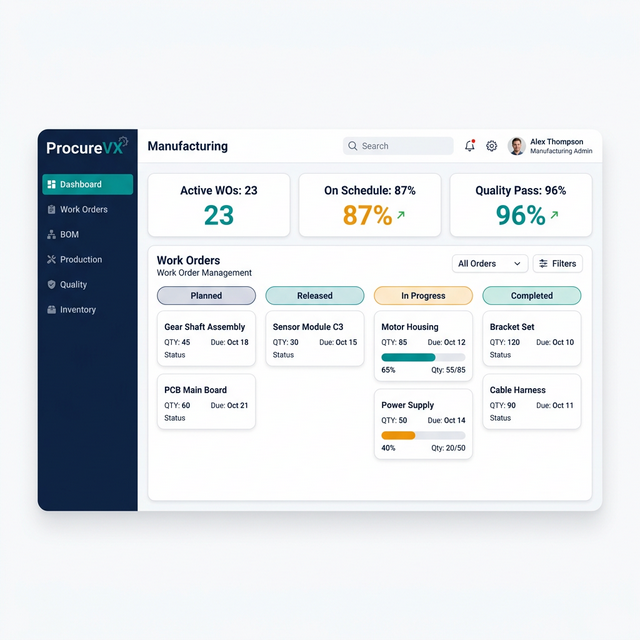
Common Manufacturing Challenges — And How We Fix Them
Paper-based work orders on the floor
Digital work orders with real-time progress
No visibility into production bottlenecks
Live dashboards with AI anomaly detection
Quality issues caught too late
Inline QC checkpoints with automatic holds
Capabilities
What Manufacturing Can Do
Demand view (orders / forecast)
See what needs to be made, by when, and what’s highest priority — the starting point for every manufacturing decision.
Work Orders (planned → released)
Create and release WOs with item, qty, due date, BOM/components, and routing. Release makes the instructions official for execution.
Shortage-first materials planning
A clear shortage list answers “what blocks production?” and supports realistic dates and approvals for substitutions.
Guided material issue / pick
Issue components from inventory to the job using required vs available guidance. Capture substitutions in an auditable way.
Operations + progress reporting
Run the routing like a checklist: start/hold/resume steps and record what’s done so teams always know “what’s next”.
Production output reporting
Report quantities produced (partial or complete), with optional lot/serial capture, so inventory and downstream planning stay accurate.
Quality inspection + disposition
Capture inspection outcomes and route failed parts to rework or scrap, keeping inventory and costing clean.
Finished goods putaway + shipping readiness
Put away finished goods to inventory (bin/location) and surface a clear “ready for fulfillment” signal for warehouse shipping queues.
Close WO + variance visibility
Close the job and summarize variances across materials, labor, and scrap so teams can improve planning and execution.
End-to-End Flow
End-to-end lifecycle (Demand → WO → Completion)
A demo-friendly manufacturing flow designed around “what’s next” and “what’s blocking production” — ending with finished inventory ready for fulfillment.
- Step 1
Identify demand
A customer order, forecast, or internal need signals: “We need X by date Y.” Demand is visible with due dates and priority.
- Step 2
Plan the work
Check feasibility: are materials and capacity available? Shortages are surfaced early so teams can act before the schedule slips.
- Step 3
Create + release a Work Order
The WO is the official instruction: item to build, quantity, due date, BOM/components, and routing/operations. Release makes it executable.
- Step 4
Issue / pick materials
Move raw materials from inventory to the job. Required vs available is guided, and substitutions are supported with approval.
- Step 5
Start production + record progress
Operations run on people/machines. The WO becomes In Progress; teams record starts/pauses and step completion.
- Step 6
Report output (partial or complete)
Record quantities produced for the WO — including partial completions — with optional lot/serial capture.
- Step 7
Quality inspection (optional)
Capture pass/fail. Failed output is dispositioned to rework or scrap so inventory and costs stay accurate.
- Step 8
Put away finished goods to inventory
Finished goods are received/put away into stock (bin/location selection) and become “ready to ship”.
- Step 9
Close WO + finalize cost/variance
Close confirms the job is done and summarizes variance (materials, labor, scrap) against expected usage and cost.
30 Seconds to Your "Aha" Moment
Watch how ProcureVX replaces fragmented tools with one unified platform — automatically, accurately, and at a fraction of the cost.
Platform Walkthrough
From PO to Payment in 30 seconds
Who It's For
The right tools for every role on the shop-floor flow.
Manufacturing spans planning, execution, and inspection. Each role needs a crisp view of what’s next, what’s blocked, and what changed.
Planner
Turns demand into planned/released work orders and manages feasibility (dates, materials, capacity).
- Review demand (orders/forecast) with due dates and priority
- Create planned/released WOs with item, qty, due date, BOM, and routing
- See shortages early (what’s missing) and adjust dates/qty as needed
- Release WOs with an audit trail so execution can begin
Production + Quality
Executes operations, reports output, and records inspection outcomes (pass, rework, scrap).
- Start/hold/resume operations and see the next step in the routing
- Issue/pick materials (required vs available) and record substitutions with approval
- Report quantities produced (partial or complete), with lot/serial capture if used
- Capture QC results and disposition: accept, rework, or scrap
- Complete the WO and hand off finished goods to inventory/warehouse
Expected Outcomes
- Faster production starts by making shortages and blockers obvious
- Better schedule reliability with clear WO statuses and due-date risk
- More accurate inventory because output and putaway are recorded consistently
- Cleaner costing with variance visibility across materials, labor, and scrap
Governance (RBAC) for planning, execution, and quality control
- View demand signals and priorities
- Create/edit planned Work Orders
- Release Work Orders with audit trail
- Replan dates/quantities based on shortages/capacity
- Start/hold/resume work orders and operations
- Issue materials and record substitutions (approval-controlled)
- Report labor/time and production quantities (partial/complete)
- Complete work orders and trigger inventory handoff
- Record inspection results (pass/fail)
- Disposition output: accept / rework / scrap
- Require QC before putaway where configured
Acceptance criteria highlights
- Demand is visible with due date and priority
- Planner can generate a Work Order suggestion and see feasibility signals (materials/capacity)
- Shortage list clearly shows what blocks start/release
- WO supports create/edit with BOM and routing overview
- Release action moves WO to executable state with audit trail
- Material issue is guided (required vs available) and supports substitutions with approval
- Production reporting supports partial completions and operation progress
- Inspection results can be captured with pass/fail and disposition (accept/rework/scrap)
- Finished goods putaway updates inventory and marks output as ready for fulfillment
- Closing a WO finalizes status and surfaces variance summary (materials/labor/scrap)
FAQ
Common Questions About Manufacturing
What’s the difference between Planned and Released?
Planned is a suggestion you can still adjust. Released is the official instruction for the shop floor — production can issue materials and start operations.
What happens if materials are short?
The WO can’t fully start until materials arrive or an approved substitution is made. Shortages are highlighted so you can expedite or replan.
Can we record partial completions?
Yes. You can report quantities produced in batches, then finish the remainder later — common for multi-day jobs or staged operations.
Do we have to use Quality?
No. Quality can be optional. If enabled, inspection can block putaway until output is accepted or dispositioned to rework/scrap.