Platform Module
Finance
Invoice → approval → payment (Accounts Payable simplified)
Accounts Payable made clear: capture invoices, validate and match them to what was ordered/received, manage holds and disputes, route approvals, schedule payment runs, and track payment/remittance — with reporting for what’s due, paid, and stuck.
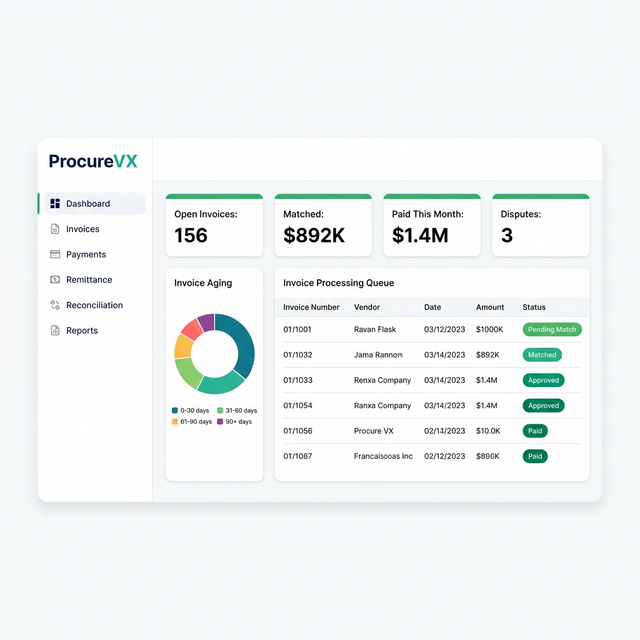
Common Finance Challenges — And How We Fix Them
Manual invoice data entry into ERP
AI-powered OCR with auto-coding
Payment remittance sent via fax/email
Electronic remittance advice (820) built-in
Reconciliation takes weeks
Automated matching with one-click exception handling
Capabilities
What Finance Can Do
Invoice intake queue
Capture invoices from portal/WebEDI/upload channels with required fields and attachments so AP can start review quickly and consistently.
Duplicate prevention + validation
Early warnings block obvious errors (inactive supplier, missing fields, duplicate invoice number) to prevent downstream rework and double-payment risk.
2-way / 3-way match with tolerances
Side-by-side compare views highlight differences across PO, receipt, and invoice. Tolerance rules can allow small variances without manual dispute.
Holds & disputes workspace
Clear reason codes, ownership, and a notes thread keep exceptions moving. Link everything back to PO/receipt/shipment for fast resolution.
Approval workflow + thresholds
Policy-based approvals capture who approved and when. High-value invoices and exceptions can require additional sign-offs.
Payment runs + scheduling
Build payment batches by due date and vendor, choose payment methods (ACH/check/wire), and schedule execution aligned with terms and cash planning.
Remittance advice + payment status
Record confirmations, store remittance advice, and provide a clear paid/scheduled/failed view for vendor and audit questions.
AP reporting (aging, holds, audit exports)
Understand what’s due, overdue, paid, and stuck in exceptions. Exports support audits and month-end reconciliation workflows.
End-to-End Flow
End-to-end lifecycle (Invoice → Payment)
A demo-friendly AP flow: intake, validate, match, resolve exceptions, approve, schedule payment, pay, and report — with strong controls to prevent overpayment and duplicates.
- Step 1
Invoice intake (capture)
Invoices arrive via supplier portal/manual upload, WebEDI, email/PDF (if supported), or freight billing. Capture supplier, invoice number/date, amount, and attachments.
- Step 2
Basic validation (fast checks)
Block obvious issues early: supplier active, required fields present, and invoice number not duplicated. Valid invoices move forward to matching.
- Step 3
Match invoice (2-way / 3-way)
Compare invoice to PO (2-way) or PO + receipt (3-way). Highlight differences (qty/price/tax/freight) and apply tolerance rules where allowed.
- Step 4
Holds & disputes (resolve mismatches)
Mismatches go On Hold until resolved: corrected receiving, corrected invoice, credit memo, or approver override within policy. Track notes, ownership, and reason codes.
- Step 5
Approval workflow
Approved invoices require business sign-off. Record who approved, when, and why — with thresholds for additional approvals on high-value or exception invoices.
- Step 6
Schedule payment
Plan when/how to pay based on terms and cash planning. Build payment runs by due date and select payment method.
- Step 7
Pay + remittance advice
Send payment (ACH/check/wire), capture confirmation, and generate remittance advice so suppliers know what was paid and why.
- Step 8
Reporting + reconciliation
Use aging, holds dashboards, and audit exports to understand what’s due, paid, and stuck — and reconcile activity with downstream finance processes.
30 Seconds to Your "Aha" Moment
Watch how ProcureVX replaces fragmented tools with one unified platform — automatically, accurately, and at a fraction of the cost.
Platform Walkthrough
From PO to Payment in 30 seconds
Who It's For
Three roles. One end-to-end AP story.
AP work is a pipeline: intake and control (clerk), policy decisions (approver), and cash execution (payments). The UI should keep each step clear and auditable.
AP Clerk
Captures invoices, performs validation and matching, and prepares items for approval.
- Work an invoice intake queue (portal/WebEDI/upload) with attachments
- Prevent double-payment with duplicate invoice warnings
- Match invoices to PO (2-way) or PO + receipt (3-way) with tolerance rules
- Place mismatches on hold with reason codes and ownership
- Link invoice to related PO/receipt/shipment for fast resolution
Approver / AP Manager
Approves exceptions and high-value invoices; reviews holds/disputes to keep flow moving.
- Approve invoices with clear “who/when” audit trail
- Apply thresholds for extra approval and exception overrides within policy
- Review holds/disputes and route to purchasing/receiving/vendor as needed
- Resolve or reject items with documented reasons
Treasurer / Payments user
Runs payment batches and confirms completion across methods (ACH/check/wire).
- Build payment runs by due date, vendor, and payment terms
- Select payment method and execute batches (ACH/check/wire)
- Confirm payment completion and record remittance advice
- Monitor paid vs scheduled vs failed payments with audit exports
Expected Outcomes
- Fewer duplicate payments through early validation and duplicate detection
- Faster invoice approvals with match visibility and exception-first workflows
- Reduced overpayment risk with 2-way/3-way matching and tolerance controls
- Better cash planning with scheduled payment runs and aging visibility
Governance (RBAC) + audit trail for payment control
- Capture invoices and attachments
- Validate required fields and duplicates
- Perform 2-way/3-way matching and apply tolerances (where permitted)
- Place invoices on hold with reason codes and assign ownership
- Approve invoices and record approvals (who/when)
- Approve exceptions/overrides within policy thresholds
- Resolve/close holds and disputes with documented outcomes
- Create payment runs and schedule payments
- Execute payments (ACH/check/wire) and confirm completion
- Generate and store remittance advice
- Export audit trails for reconciliation
Acceptance criteria highlights
- Invoice intake queue supports attachment upload and basic capture (supplier, invoice #, date, amount)
- Duplicate invoice warnings prevent double-payment for same supplier + invoice number
- Required-field validation blocks submission to matching when incomplete
- 2-way match (PO↔Invoice) and 3-way match (PO↔Receipt↔Invoice) are supported conceptually with side-by-side compare
- Differences are highlighted (qty, price, tax, freight) and tolerance rules can be applied
- Mismatch routes invoice to On Hold/Disputed with reason codes
- Hold resolution supports notes thread + task ownership + links to PO/receipt/shipment
- Approval workflow records who approved and when with thresholds for extra approval
- Payment run screen filters by due date/vendor and supports method selection
- Payment completion updates invoice status to Paid and stores remittance advice
- Reporting includes aging and holds/disputes visibility with audit exports
FAQ
Common Questions About Finance
Do we have to do 3-way matching for every invoice?
No. 2-way match (PO↔Invoice) is common for services or when receiving isn’t tracked. 3-way match (PO↔Receipt↔Invoice) is typically used for physical goods when stronger controls are required.
What happens when an invoice doesn’t match?
It goes On Hold / Disputed with a reason code and owner. Resolution can come from corrected receiving, a corrected invoice, a credit memo, or an approved override within policy.
How do you prevent duplicate invoices from being paid?
AP performs basic validation early, including duplicate invoice number checks by supplier. The UI surfaces warnings before approval/payment steps.
How does Finance connect to Purchasing, Warehouse, and Transportation?
Matching links invoices to the related PO (Purchasing), receipts (Warehouse), and freight bills/shipments (Transportation) to make exceptions and approvals easy to explain and audit.